Osko on PaymentsPlus User Guide
Osko® is Australia’s real-time time payment service, allowing your organisation to send fast, data-rich payments 24/7 via the New Payments Platform (NPP). Payments are typically delivered in under a minute and include richer payment information than traditional channels - helping reduce manual follow-up and speeding up reconciliation.
Osko Flex is an optional PaymentsPlus module that enables payments to automatically fall back to Direct Entry (EFT) if a payee’s account can’t receive NPP payments.
- Request your Westpac representative to enable the Osko or Osko Flex modules.
St. George customers
Osko and Osko Flex modules are not available to customers of St. George.What you can do with Osko on PaymentsPlus
- Pay suppliers or customers in real time
- Send payments at any time, including weekends and public holidays
- Make on demand or scheduled payments demand or scheduled payments
- Include meaningful payment descriptions for easier reconciliation
- Reduce reconciliation delays with instant confirmation
Submitting Osko Payments
You can submit Osko payments individually or in bulk through any of the following channels:
- API (individual or file-based payments)
- iLink (file-based payments)
- PaymentsPlus portal (file-based payments)
Making Individual Osko payments
- Integrate with the Payments API
Use the Payments API to initiate a single Osko payment immediately from your system. This is ideal for:
- ERP or CRM driven transactions driven transactions
- On demand customer or supplier payments demand customer or supplier payments
- Internal workflows (e.g., refunds, supplier disbursements)
- Embed the API Request into your payment workflow
Your internal systems can automatically:
- Construct the payment
- Submit the request
- Handle and interpret the response
- Store the transaction reference for audit and reconciliation
-
Receive response For a single immediate request made through the API, you will receive the Payment Response Model.
-
Get payment details
You can also poll the API (or use callback logic) to retrieve payment response and status at any time post payment submission. You will receive:
- Final Osko payment status
- Applicable Osko response codes
- Any enriched metadata returned by the receiving bank
Review the Payment Response Model to understand the information returned for each payment, including the recipient response model for Osko.
Making file-based Osko payments
PaymentsPlus supports high-volume batch processing using the following formats:
- Australian Payment Import CSV: Osko Payment Record
- ISO 20022 (pain.001)
Access a Sample CSV file
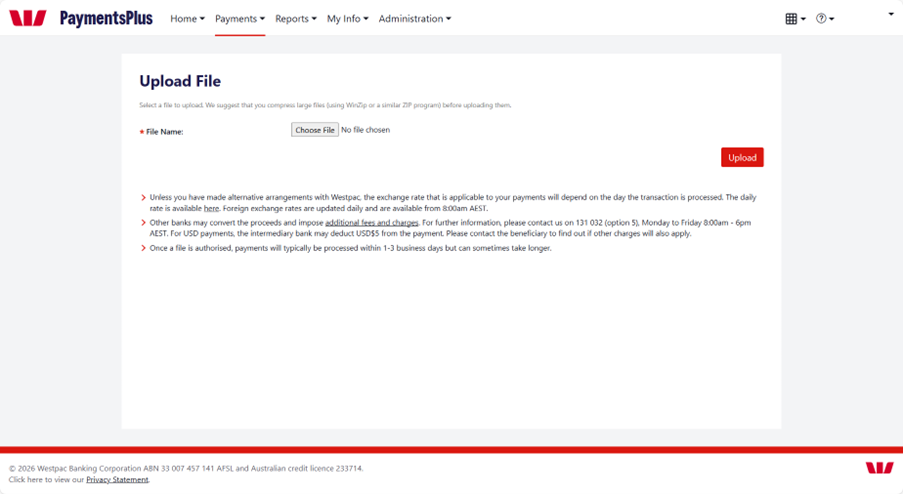
Submitting file-based payments
You can submit a payment file through any of the following: • Files API • iLink • PaymentsPlus portal
Integration consideration:
- API: Best for ad hoc real-time payments or multiple smaller file submissions.
- iLink: Best for single, large payment file transfers and high-volume batch processing.
- Portal: Intended as a contingency option or an interim manual workflow during early adoption.
ISO 20022 Considerations
If using an ISO 20022 file (pain.001), there are some capacity considerations for your file to improve success. Speak to your Westpac Representative for support with your use case.
Supported Payment Types
PaymentsPlus supports the following payment identifiers for Osko:
- BSB & Account Number (BBAN)
Important: Consider verifying account ownership before submitting the payment either prior to transaction processing or at onboarding using Westpac Verify with Confirmation of Payee.
- PayID (email, mobile, ABN or Organisation ID)
When a PayID is supplied:
- PaymentsPlus performs a PayID name check as part of the payment process.
- If the receiving bank provides a shortened or alternative name, we return this to help you validate before deciding whether to proceed.
- This helps reduce misdirected payments and improves payee assurance.
- Depending on your use case, there may be some PayID resolution limits to consider. We recommend discussing these with your Westpac representative to ensure the solution fully supports your requirements.
Enriched payment data
Osko enables you to enrich a payment with additional data, making auditing and reconciliation easier for both you and your payee. These optional fields include:
| Debtor information | Consider providing the entity initiating the payment, such as the business name or payment reference. This helps recipients and internal teams identify who sent the payment, especially where multiple legal entities or accounts exist. |
| End-to-End ID | Include a unique payment or invoice reference, such as an invoice number, agreement ID, or platform generated transaction ID. This value is returned in response files and is useful for end-to-end traceability and reconciliation. |
| Remittance 1 | Appears as the first line of remittance information delivered to the payee (e.g. via email remittance or their bank statement transaction narratives). |
| Remittance 2 | Use this to add supplementary context, such as service period, customer name, agreement reference, or other payment details cues. This can reduce follow‑up queries from payees. Payees will typically see this when they access their transaction details. |
Testing Osko payments
Use this test data to review Osko behaviour in the PaymentsPlus sandbox.
Payment receipts
As with all payments on PaymentsPlus where email delivery is specified, your payee will receive an email remittance.
Reporting and Response files
A response file is generated when all payments in your batch are complete.
- If you originally loaded a pain.001 file, you could request a pain.002 response file or
- Request a CSV response file
Review the File Model including the Recipient Account Request Model for Osko payments.
You can also:
- Extract reports from the PaymentsPlus portal for daily transactions
- Retrieve reports through the API at any time
- Receive automated reports via iLink
- Receive statement feeds through BankRec
Integration consideration:
If a file contains both Osko and non-Osko payments: Osko payments:
- PaymentsPlus will only return the response file once all payments are complete
- If you need immediate Osko confirmation, submit Osko payments in a separate file.
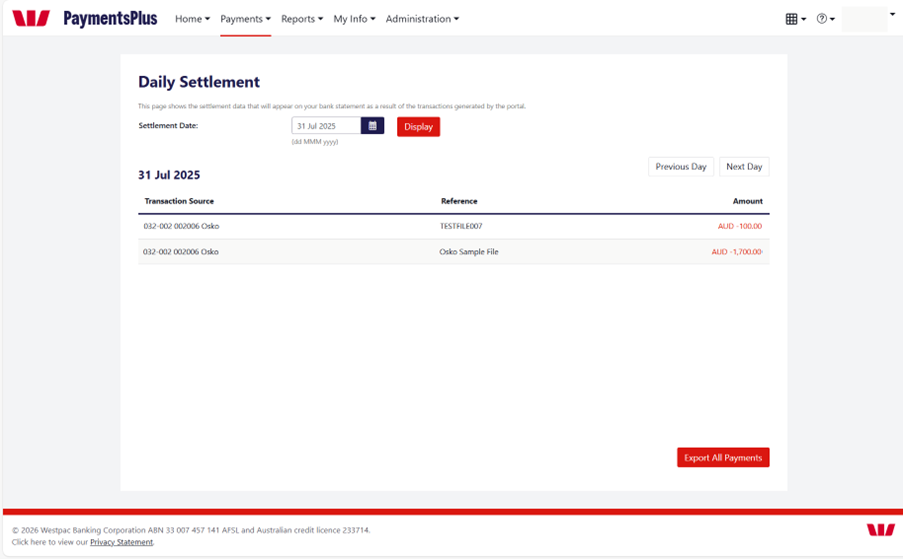
Bank statements
As Osko transactions are NPP payments:
- Each Osko payment appears as an individual debit
- Any returned Osko payments appear as individual credits
Osko Debit (Transaction code: 817)
WITHDRAWAL-OSKO PAYMENT 8F92A1BC234 BIGCO SUPPLIES PTY LTD INV-48392
- WITHDRAWAL-OSKO PAYMENT → Standard NPP/Osko debit identifier
- 8F92A1BC234 → End-to-End ID used to link reporting, returns and BankRec enrichment to End ID used to link reporting, returns and BankRec enrichment
- BIGCO SUPPLIES PTY LTD → Payee/Beneficiary name
- INV-48392 → Your remittance / reference field
Osko Return / Reversal – Credit (Transaction code: 887)
DEPOSIT-OSKO PAYMENT REVERSAL 8F92A1BC234 AC07 ACCOUNT CLOSED
- DEPOSIT-OSKO PAYMENT REVERSAL → Standard NPP/Osko payment reversal identifier
- 8F92A1BC234 → End-to-End ID used to link reporting, returns and BankRec enrichment
- AC07 ACCOUNT CLOSED → Status code and reason
Osko attempt reversed due to NPP reach or other exception
If you prefer a bulk style view for reconciliation, you can use BankRec to group NPP items and apply your own narrative style view for reconciliation, you can use BankRec to group NPP items and apply your own narrative.
Integration consideration:
If you are using BAI2 or MT940 or similar legacy statement formats, be aware that these may not fully support Osko’s enriched NPP data. As a result, some payment details may be truncated or unavailable in your statements.
If your systems support it, consider transitioning to camt.053 or Extended CSV statement feed via BankRec, which provides fuller access to Osko’s enriched data and supports more robust reconciliation.
Tip:
Osko payroll transactions show payments to each employee as a separate transaction. To manage visibility and access, consider using a dedicated account or applying relevant account access authority.Processing high-volume Osko files
PaymentsPlus can process large Osko batches in a single file. Once processed, the payments are delivered in real-time to your payees.
Depending on volume:
- There may be a short technical processing interval depending on how many payments you have in a single file.
- Osko on PaymentsPlus throughput is continually enhanced - speak to your Westpac representative for current performance benchmarks.
Osko Response Codes
Osko uses a different response code model to Direct Entry (EFT). Review the full list of Osko status codes and recommended handling behaviours.
Tip:
When transitioning from Direct Entry (EFT) to Osko, you may discover that the payee’s account does not support NPP payments. These scenarios typically return one of the following NPP response codes: AC14, AG03, or BE06.
Review the relevant system handling instructions and ensure your downstream processes can respond appropriately. This may include:
- Retrying the payment via Direct Entry, and/or
- Notifying the payee and requesting an NPP-enabled (Osko reachable) account or
- Using Osko Flex
Osko Flex
If you would like Westpac to handle exceptions related to NPP reach, consider processing the payment as Osko Flex. Osko Flex provides automated fallback handling for failed Osko payments.
How Osko Flex Works
- Set the Record Type to Osko Flex (OF)
- If an Osko payment fails because the receiving account is not NPP-enabled, PaymentsPlus will automatically and silently fall back to Direct Entry (EFT)
- The payment continues to the customer or supplier without manual intervention.
If submitting the payment using the ISO 20022 format, use the following fields/values:
| Field |
|
|
|
|---|---|---|---|
| Value | TRF | URGP | PAYANYONE |
Important Notes
- Osko Flex can only be used for BSB + Account payments
- Not available for PayID payments
- Osko Flex needs to be enabled in your PaymentsPlus prior to use.
Tip:
Osko supports extended remittance information (over 200 characters). However, if a payment is processed via the Direct Entry network, the remittance/reference information may be truncated to the Direct Entry limit (18 characters).
For Osko Flex payments, ensure any critical remittance information appears within the first 18 characters, as only these characters will be retained if the payment falls back to Direct Entry.
Reporting for Osko Flex
Osko Flex payments appear in your standard PaymentsPlus response file or response model.
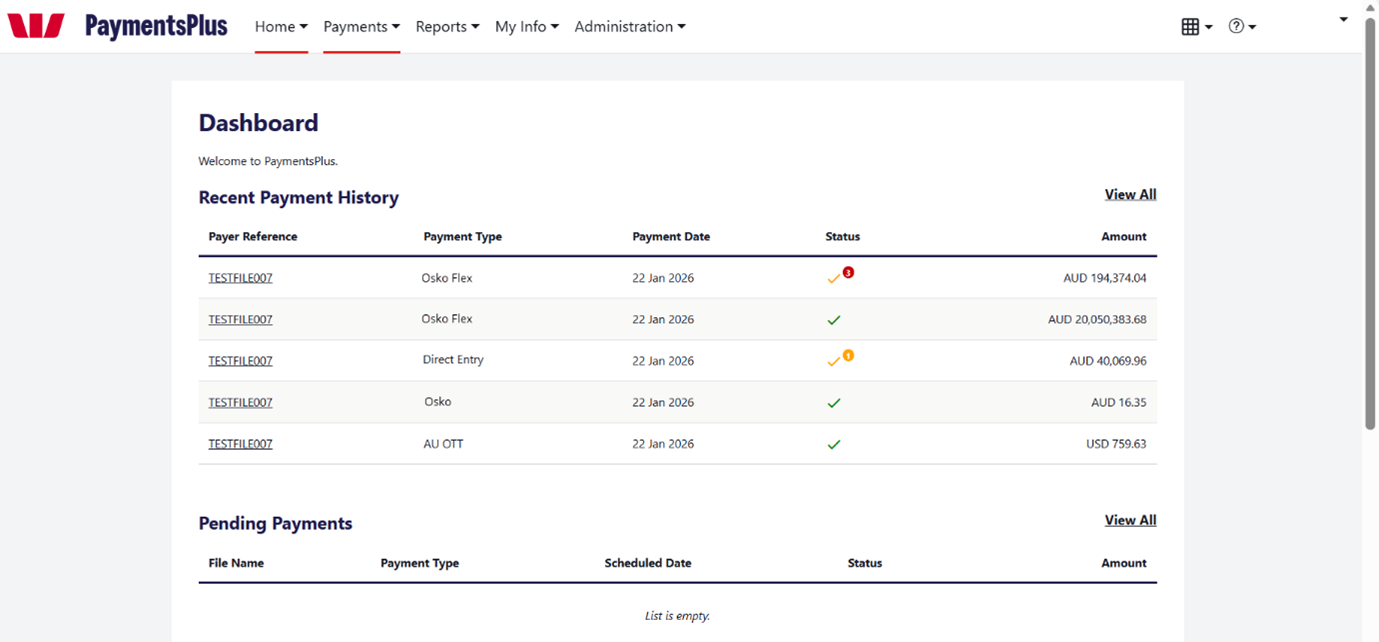
In the PaymentsPlus dashboard:
- The payment type displays as Osko Flex.
- Clicking into the transaction shows whether it was completed via Direct Entry or Osko.
Osko Flex in Bank Statements
Because Osko Flex uses both real-time (Osko) and fallback (Direct Entry) processing, you may see multiple entries for the same payment on your bank statement.
When a fallback occurs:
- The initial Osko attempt appears as an individual debit for each payment
- If Osko cannot be completed, that debit is reversed as a credit. Each Osko credit will appear as a separate entry.
- A Direct Entry debit is then applied for each individual fallback payment.
- Any Direct Entry items that later fail will return as individual credits.